ink   <- "#3a2f1e"
paper <- "#faf5ea"

# A rounded swatch that fills a grid cell, and the caption beneath it.
swatch <- function(gp) roundrect_grob(y = 0.58, width = 0.66, height = 0.6, r = 0.05, gp = gp)
cap    <- function(txt) text_grob(txt, y = 0.12, gp = vl_gpar(fontsize = 12, fontface = "bold", col = ink))

# Two overlapping discs, reused to show how a *group* of shapes composites.
discs <- function(scene) {
  scene |>
    draw(circle_grob(x = 0.42, y = 0.58, r = 0.2, gp = vl_gpar(fill = "#c1121f", col = NA))) |>
    draw(circle_grob(x = 0.60, y = 0.58, r = 0.2, gp = vl_gpar(fill = "#2a6f97", col = NA)))
}
The paint model
Backend
Gradients, tiling patterns, masks, group opacity, and blend modes, drawn straight from vellum grobs with no grammar in sight.
Fills in vellum are more than flat colours. A vl_gpar(fill = ...) accepts a linear or radial gradient or a tiling vl_pattern(), and a viewport can composite its contents as one isolated layer through a mask, a group opacity, or any of the CSS blend modes. None of this needs vellumplot; it is the raw paint model the grammar draws on.
Every panel below is one swatch plus a caption, placed into a 4x2 grid layout.
The masks are grobs in their own right. An alpha mask lets the fill show through wherever the mask is opaque (here, the letterforms); a luminance mask uses brightness instead, so a white-to-black radial gradient fades the layer to a soft vignette.
# Alpha mask: a gradient rectangle seen only through the word "paint".
alpha_mask <- as_mask(
  text_grob("paint", gp = vl_gpar(fontsize = 30, fontface = "bold", col = "white")),
  type = "alpha"
)

# Luminance mask: white shows, black hides, so the fill vignettes to nothing.
lum_mask <- as_mask(
  circle_grob(r = 0.46, gp = vl_gpar(fill = radial_gradient(c("white", "black")), col = NA)),
  type = "luminance"
)

# A dotted tile, repeated across a cell to fill a shape.
dot_tile <- circle_grob(r = 0.3, gp = vl_gpar(fill = ink, col = NA))
Now assemble the grid. push() a cell viewport, draw into it, pop() back out. The mask, opacity, and blend panels push a second viewport inside the cell so the compositing applies to that layer alone.
grid <- grid_layout(
  widths  = vl_unit(rep(1, 4), "null"),
  heights = vl_unit(rep(1, 2), "null")
)

scene <- vl_scene(width = 9, height = 4.6, bg = paper) |>
  push(vl_viewport(layout = grid)) |>

  # Row 1
  push(vl_viewport(row = 1, col = 1)) |>
  draw(swatch(vl_gpar(fill = linear_gradient(c("#6b4f2c", "#f7c948"), x1 = 0, y1 = 0, x2 = 1, y2 = 1), col = NA))) |>
  draw(cap("Linear gradient")) |> pop() |>

  push(vl_viewport(row = 1, col = 2)) |>
  draw(swatch(vl_gpar(fill = radial_gradient(c("#fff3b0", "#c1121f"), cx = 0.4, cy = 0.62, r = 0.6), col = NA))) |>
  draw(cap("Radial gradient")) |> pop() |>

  push(vl_viewport(row = 1, col = 3)) |>
  draw(swatch(vl_gpar(fill = vl_pattern(dot_tile, width = 0.12, height = 0.12), col = ink, lwd = 1.5))) |>
  draw(cap("Tiling pattern")) |> pop() |>

  push(vl_viewport(row = 1, col = 4)) |>
  push(vl_viewport(y = 0.58, width = 0.66, height = 0.6, mask = alpha_mask)) |>
  draw(rect_grob(gp = vl_gpar(fill = linear_gradient(c("#2a6f97", "#c1121f")), col = NA))) |> pop() |>
  draw(cap("Alpha mask")) |> pop() |>

  # Row 2
  push(vl_viewport(row = 2, col = 1)) |>
  push(vl_viewport(y = 0.58, width = 0.66, height = 0.6, mask = lum_mask)) |>
  draw(rect_grob(gp = vl_gpar(fill = "#6a4c93", col = NA))) |> pop() |>
  draw(cap("Luminance mask")) |> pop() |>

  push(vl_viewport(row = 2, col = 2)) |>
  push(vl_viewport(alpha = 0.5)) |> discs() |> pop() |>
  draw(cap("Group opacity")) |> pop() |>

  # Blend modes composite onto a mid-tone swatch so both the darkening of
  # "multiply" and the lightening of "screen" stay visible.
  push(vl_viewport(row = 2, col = 3)) |>
  draw(swatch(vl_gpar(fill = "#8f8a7e", col = NA))) |>
  push(vl_viewport(blend = "multiply")) |> discs() |> pop() |>
  draw(cap("Blend: multiply")) |> pop() |>

  push(vl_viewport(row = 2, col = 4)) |>
  draw(swatch(vl_gpar(fill = "#8f8a7e", col = NA))) |>
  push(vl_viewport(blend = "screen")) |> discs() |> pop() |>
  draw(cap("Blend: screen")) |> pop() |>

  pop()
render() writes the scene to whichever format the extension names. A raster and a vector come off the same scene graph:
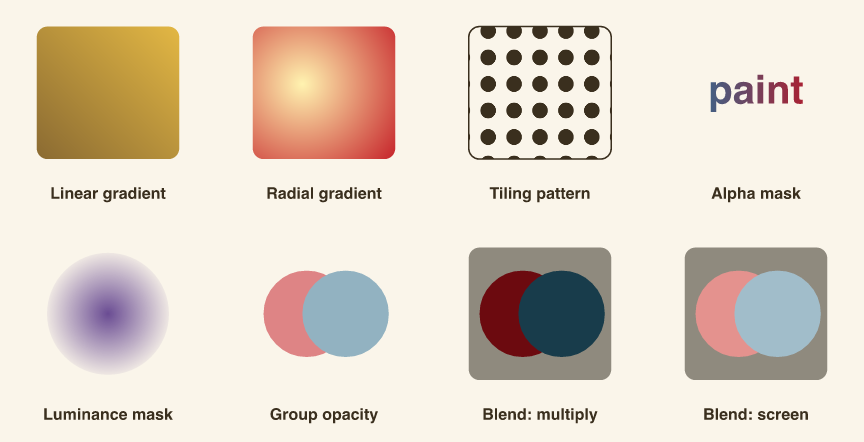
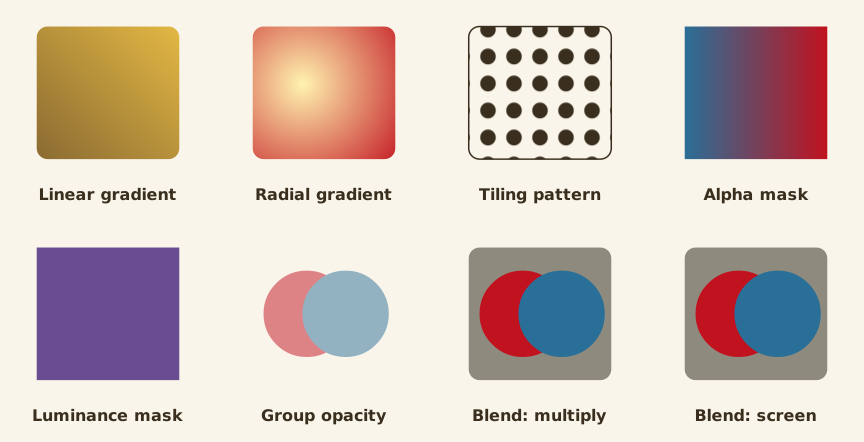
Group opacity is the subtle one. Setting alpha on the viewport composites the two discs as a single layer, so their overlap does not darken; a per-element vl_gpar(alpha = ) on each disc would. The blend modes ("multiply", "screen", and the rest of the CSS mix-blend-mode set) mix that isolated layer into the backdrop below it.
One caveat for the print path: the PDF backend has no image support yet, so a vl_pattern() fill degrades to the tile’s average colour there. Gradients, masks, opacity, and blends carry through to PDF unchanged. This is the same retained scene graph that vellumplot compiles into and that vellumwidget reads for interactivity.